Sunday, April 10, 2022

WSJTX ver 2.5.4 , HAMLIB 4.4 and RIGCTL error - how to solve on Ubuntu 20.04.03

Hello everyone.

NOTE: I run Ubuntu 20.04.03 but I suppose this explanation will help everyone running linux like operating systems.

Due to personal stuff to do these months I did not manage to update to latest WSJTX 2.5.4 so I decide to do it first available weekend. So it be.

So at first I installed wsjtx v 2.5.4 . I suppose you already know how to installed because you arrive at my page seeking for solution  for the same problem I already had ;)

Unfortunately when I tried to start wsjtx (which runs under cqrlog logging software) I started to receive errors sayng there is a problem with rigctl and hamlib .

So, I started browsing the net and I find that in order to avoid such message I have to install latest hamlib. I did not know (to be honest I forgot) what version I run, so i check it first with following command:

rigctl --version

I received info that I am using existing cqrlog's hamlib version 3.3

So , I had to download latest hamlib and recompile it by myself.

There is two variants: first one is to download latest hamlib directly from it's github and the other is to connect to github with git from where in terminal you will install hamlib. Both variants will be described.

Well, hamlib's github link is https://github.com/Hamlib/Hamlib .

Here you can  find latest editions and all previous ones from hamlib.

Now, I will explain both options for installing hamlib:

V.1 :
- Download latest hamlib to your computer and extract it.

- go to extracted hamlib directory and open terminal in it, starting typing these commands:

sudo ./configure
sudo make
sudo make install
 
V.2 : Connecting to github via git software (sudo apt get-install git)
 
Execute these command in your terminal: 
 
git clone https://github.com/Hamlib/Hamlib.git
cd Hamlib
sudo ./bootstrap
sudo ./configure
sudo make
sudo make install
 
Later you can make update to hamlib just with typing in terminal these commands in Hamlib folder created by git clone command:
 
git pull

and recompile library again as described above.

And now comes the tricky part. 

If you try to run rigctld --version you will receive this message:

rigctl: error while loading shared libraries: libhamlib.so.4: cannot open shared object file: No such file or directory
 
What happened, I followed all the procedure, why it this happening ???

So, I continue to search for explanation and I found it, just before quiting and removing latest hamlib and wsjtx from my computer, getting back to previous one versions. This explanation I found in just one post (at least I could find it browsing the net), saying that we have to run additional command

sudo ldconfig
 
This little comand explanation is : ldconfig is a utility that indexes shared object names to simplify loading on shared object libraries by executables. It scans standard directories and those found in the ld. so. conf configuration file and stores its index in ld.
This command makes rigctl to be able to detect hamlib !?
 
Now check rigctl:
 
rigctld --version
 
also checking 
 
rigctld-wsjtx -- version 
 
You should receive positive feedback in a message saying:
 
rigctl Hamlib 4.5~git Sat Jan 01 23:05:51 2022 +0000 SHA=18548e

Fine, looks like we managed to link rigctl with hamlib. Great.

BUT...

In addition everything to work you should also do these last steps:

Open CQRLOG -> Preferences:
 
1. re-select you rig (in my case it is Kenwood TS480) and check com parameters.
 
2. change path of rigctl , replacing usr/local/binrigctl path with usr/local/binrigctl-wsjtx (this is the same path but rigctl is replaced with rigctl-wsjtx)
 
Close CQRLOG and open it again to reload rigctl.
 
Then open WSJTX and re-check config parameters also, there should not be any error now at the opening and wsjtx should work properly with your rig and cqrlog.

I hope this text will help lot of radio amateurs to solve this small but still big issue when upgrading wsjtx and hamlib .

73 de Z34PEC

Sunday, April 18, 2021

CQR LOG and MYSQL problems after updating Ubuntu 18.04 to 20.04 or clean install on Ubuntu 20.04

 I supopse there are lot of HAM operators who upgraded from Ubuntu 18.04 to 20.4 do some clean install on ham software they use, including CQR Log.

I faced problems with MySql database in reports saying it could not initialise database or similar.

Looks like instead of MySql , CQR Log use Mariana DB .

So I tried first to install mariana db:

sudo apt install mariadb-server-10.3

and then to install CQLog.

Looks like it works. Mariana db also uninstall mysql from your computer so it should also work if you have previously installed cqrlog and had the problem with database.

73 Z34PEC

Wednesday, March 17, 2021

How to fully backup and restore your android device without root


How to fully backup your Android smartphone or tablet without root |

How to enable USB debugging |

  1. Go to your Settings menu
  2. Scroll down and tap on System
  3. Select About phone
  4. Tap on the device’s Build number multiple times until it enables Developer options. Newer devices will require you to enter your PIN/password/pattern
  5. Hit the back button and select Developer options within the System menu
  6. Make sure Developer options is toggled on. Scroll down and toggle USB debugging on


How to backup your Android device’s data |

  1. Plug your Android device into your computer
  2. Using either Command Prompt or Terminal, navigate to the folder in which the ADB tools are located and type in “ADB devices“. A pop-up on the Android device will appear if you need to grant your computer permission to interact with the phone or tablet. You will know if the command worked on your computer if it returns with the connected device’s identification number
  3. Type in “adb backup -apk -shared -all -f <filepath>/backup.ab
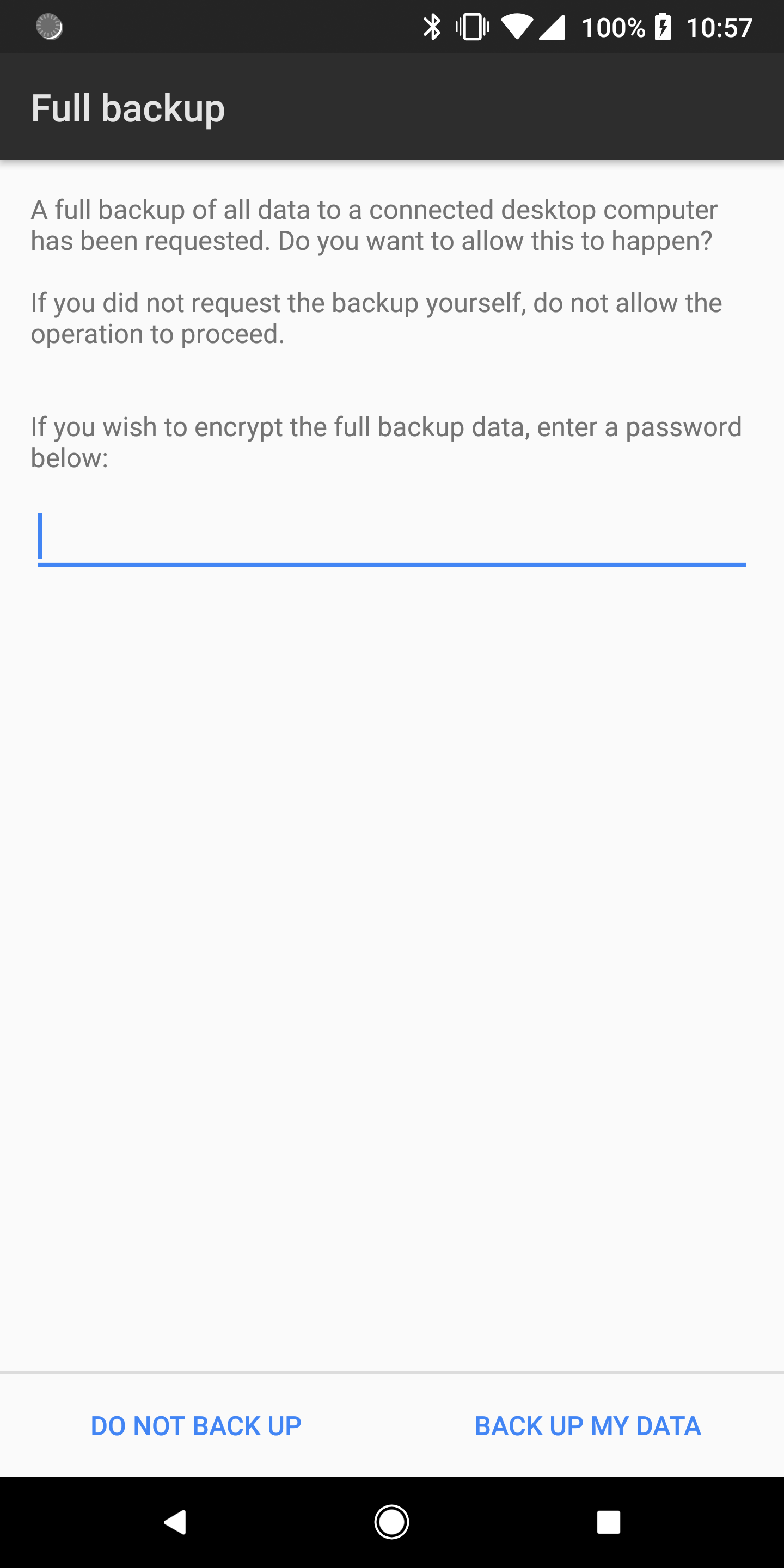
  4. Your Android device will now show the full backup window. Here you can encrypt your backup with a password (which is recommended)
  5. Tap on Back up my data
  6. This process can take several minutes and when completed, a new file will be placed on your computer


How to restore your Android device’s data |

  1. Plug your Android device into your computer
  2. Using either Command Prompt or Terminal, navigate to the folder in which the ADB tools are located and type in “ADB devices“. A pop-up on the Android device will appear if you need to grant your computer permission to interact with the phone or tablet. You will know if the command worked on your computer if it returns with the connected device’s identification number
  3. Type in “adb restore <filepath>/backup.ab
  4. Your Android device will now show the full restore window. If you added a password to your backup file, enter it in the space given
  5. Tap on Restore my data
  6. This process can take several minutes and when completed, most if not all of your previously installed applications will be present on your device as well as photos and other data.

With respect: (c) Justin Duino

Sunday, January 10, 2021

Optocoupler RF protection module for RS232 CAT control for Kenwood TS480HX

 My new shack is more than a year installed on my new location near to old one.

I knew I had some RF noise coming from my PC but I did not pay too much attention till these days. It finally had it turn to be solved.

Main noise source is coming from my RS232 (DB9 female-female) CAT cable. This is simple straight DB9 serial cable that could be bought in every electronic shop.

Discussing with my collegue Z35O (Goran Trajanovski) how to eliminate this coming noise, usually at 7.140MHz, we made a conclusion:

1. To use torroide and to make couple of turns on serial cable

2. To use some new solution base on experience from users using it on Kenwood TS450S ( Interfacing Kenwood TS-450S to your soundcard

Option 1 is rejected because ordering FT torroide and waiting for it in these days situation will took too long.

So , Goran Z35O suggested to try second option.

And we made it. Yet not tested but assembled and waiting for test period.

I would like to share this idea with other HAM operators (also aplicable for other radios) and post their experience with it. 

Used Pins: 2,3,5,7 and 8. Used material: 4xR470, 4 LED, 4x4N33 optocouplers.

Note: Pin 5, GND is closed loop separated for each side (it is not coming from PC to radio).

Many thanks for Goran Z35O for making this module.


Update 08.March.2021 : unfortunately this idea does not work. Looks like compared to ts450 that is using ttl levels of signals, ts480hx is using other signals type. 

Maybe this idea will inspire other amateur to try some other way and make proper working connection with galvanic-optocoupler protection.

73


Saturday, December 5, 2020

ATU-100 by N7DDC

Couple of days ago I receive my ATU-100. Interesting automatic tuner for a little of money. It has extended board in it (7*7) and a display. I tested it almost on all bands even on 160m and I can say it can handle my 8.2m long wire antenna with swrlower than 2:1. It works only in auto mode and I suppose it does not memorise settings for each band. But it tune fast ;) . It can handle up to 100w and I tested it with digi modes also work with about 35w output. According to seller it could possibly handle around 50-70w but I would not risk so much power at this moment, and as far as I know digi modes are designet to be used with low power :). Anyway, here is pics of it. Case is 3d printed and need additional finishing for good looking impressions.
I did not have much time to buy it in a kit, so that is why I bought it assembled.


Tuesday, May 12, 2020

Setting WSJTX and CQRLog

World pandemia make lot of people stay at home these months. It gives you time to do and done jobs that has been left for months before due to lack of time and willing to do them :)
Digimodes were on of them, left for better times mostly because of my dissapoint while working with Icom 706MKII.
Kenwood TS480HX is much more easier to set up to work with digi.
I made my digi cable using IU2MEH's guidance:  if you have old ps/2 keyboard there is chance to have enough wires in the cable to use it as a data cable for it. I tried with cable from ps/2 mouse but 3 out of 4 wires were correctly connected and the last one was connected to other pin. So, I use simple CAT5 cable, miniDin 6p and two 3.5mm stereo jacks. Do some tricky soldering of  miniDIN 6p and adter one destroyed miniDin jack, I made it :)
Here is link to manual: IU2MEH's SAT480 digi cable manual
I managed to set WSJTX and start work on digimodes.
I made lot of contacts and what I found litle bit tricky was importing every contact of WSJTX's adif log file to CQRLogm my program I use to work since I have HF radio.
So, I decide to find a solution how to make direct logging in to CQRLog. I know there is a option to use wsjtx but it is tricky to find it on the net. There is short instruction from OH1KH on Youtube so you can watch it there: WSJTX and CQRLog proper setting

In short: In WSJTX you have to choose HAMLIB rigctl given under radio option. Set Network Server to: Set LocalHost: xxxx , where xxxx is a port from a radio defined in CQRLOg radio settings.


Also in WSJTX in reporting tab you have to check boxes also where UDP is mentioned.

In CQRLog you just have to define WSJTX launch (in Ubuntu it is /usr/bin/wsjtx) path and check Run WSJTX efter entering.... option. This means that when you under File option choose remote mode for wsjtx, WSJTX will be automatically started. So take a note not to start WSJTX before entering remote mode from CQRLog. Also, please take a note that when you work like this, CQRLOg is in offline mode (that it should be) so do not worry.


When WSJTX started, minimize CQRLog and work normal with WSJTX. Every confirmed QSO in WSJTX is automatically logged in CQRLog also.
When you plan to end with your work, just close WSJTX and turn off enable remote mode for wsjtx in CQRLog under File option (previously choosen). Now you can continue your work with CQRLog and other modes with your radio.

That is it. Video guidance and above written is enough to start working digimodes.

73

Saturday, February 29, 2020

My new home and radio shack

Well it has been past 6 months since I moved to a new apartment. It is bigger than previous one so I have my own space for me :) . Unfortunately I  still at lower floors of the building (3rd fllor, around 13m above ground) and with a not so good options for my new antenna. Putting it on a roof require abot 30-40 meters of cable either Rg58 or Rg213, and a acceptance for mount of antenna, signed from 50% + 1 of neighbors living in my building. So I decide to temporarily put longwire (short, just 6.5m) from my balcony in orther to work. Got Kenwood Ts480HX as a base station and put my Icom 706mk2 in a suitcase for portable use. Helped by a friend, also a ham operator, that made for me noice cancelator, required for those ugly street led lights just below my window. Got used but good linear power supply 22amps and kept the old one, electronic-pulse, power supply for a backup. Have another two, one is halogen 30amps power supply and other is also linear but only 7amps, but due to limited space I am forces to keep them packed. 
For start it is not so much for a new shack. But it works :) and I started making qso's.  
Unfortunately lot of noise on 40m band due to some foreign radar interfere and also bad propagations, but it's satisfactory.
73
My new shack.
Good oldie but goldie Icom :)